
Adjustable Notification Cadence
We’re excited to announce Adjustable Notification Cadence – giving you control over how frequently you receive notification messages from your lab devices.
The Challenge
Previously, notifications were sent at fixed intervals determined by the device itself, potentially flooding lab managers and members with messages and leading to information fatigue.
The Solution
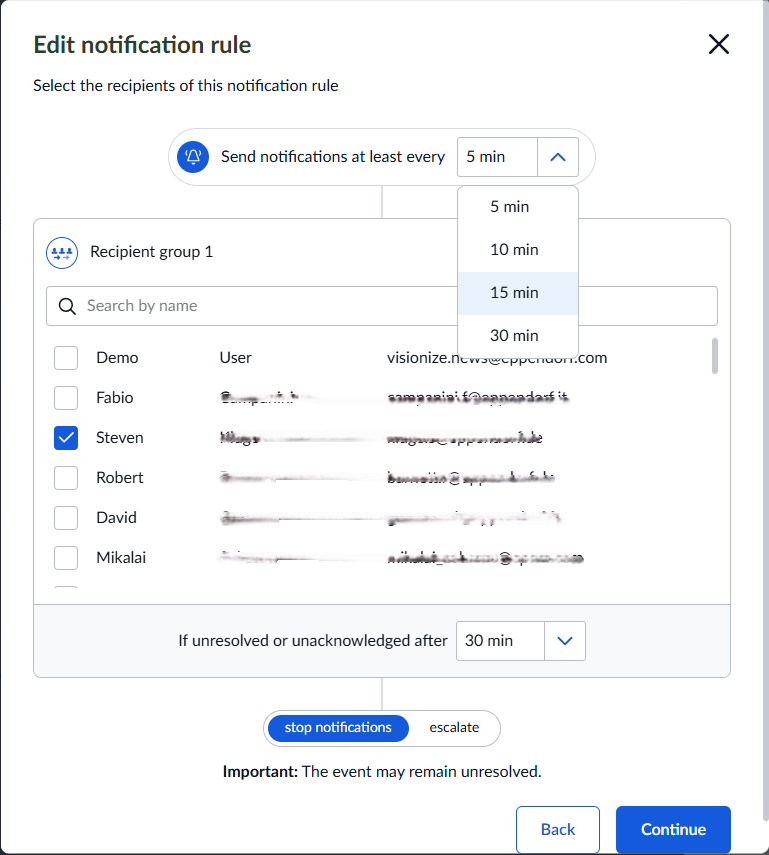
You now have the power to configure the time interval at which notification messages are sent out, ensuring you stay informed without being overwhelmed.
How It Works
When setting up or editing a notification rule with escalation scheme, you can now choose from predefined, reasonable time intervals:
- 5 minutes - For critical situations requiring immediate attention
- 10 minutes - Balanced approach for urgent but manageable issues
- 15 minutes - Standard interval for routine monitoring
- 30 minutes - Reduced frequency for less critical notifications
Key Benefits
- Prevent information overload - Control message frequency to match your workflow
- Reduce notification fatigue - Stay alert to what matters most
- Customizable per rule - Different cadences for different types of incidents
- Intuitive configuration - Easy-to-use dropdown with predefined intervals
This enhancement delivers on our commitment to provide flexible, not one-size-fits-all solutions. You now have the control to tailor notifications to your specific lab management style and operational needs.
Take control of your notification experience today!