
VisioNize AI Assistant Now Available
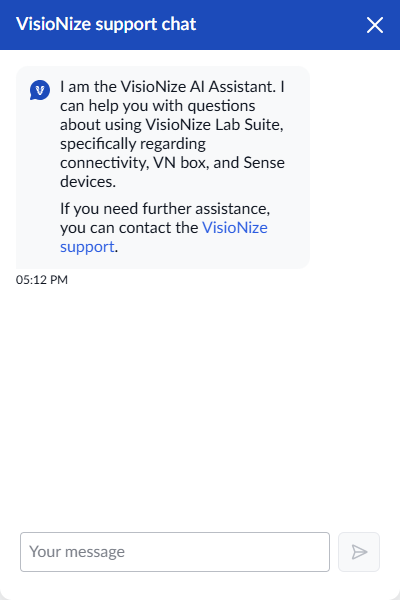
We’re excited to introduce the VisioNize AI Assistant – your new intelligent chatbot for instant troubleshooting support and quick answers to common questions about VisioNize Lab Suite.
Instant Self-Service Support
Our VisioNize AI Assistant helps you with questions about using VisioNize Lab Suite and your connected devices. The curated knowledge base is constantly updated by Eppendorf, and the Assistant is still learning. If it is not able to provide an answer for you today, please come back in the future. Ensure to always use your devices in compliance with the Operating manuals issued by Eppendorf.
What the Chatbot Can Help With
The chatbot has been trained on comprehensive VisioNize documentation and can assist with:
- Subscription Information - Understanding available tiers and features
- Module Overview - Learning about different VisioNize modules and capabilities
- Device Management - Registering new devices and navigating the inventory view
- Notification Setup - Creating and updating notification rules
- General Troubleshooting - Common issues and their solutions
- Feature Guidance - Step-by-step help with VisioNize functionality
Key Benefits
For Lab Managers & Members
- 24/7 Availability - Get answers anytime, even outside business hours
- Instant Resolution - No waiting for email responses or support tickets
- Comprehensive Knowledge - Access to all available VisioNize documentation
- Productivity Gains - Spend less time searching for answers, more time managing your lab
Enhanced Support Experience
- Faster Time to Resolution - Immediate responses to common questions
- Consistent Information - Reliable, up-to-date answers every time
- Learning Assistant - Helps you become more proficient with VisioNize features
How It Works
The VisioNize AI Assistant leverages advanced language model technology, trained specifically on VisioNize documentation and use cases. This ensures relevant responses tailored to your VisioNize Lab Suite questions.
Continuous Improvement
As we gather feedback and usage data, the chat bot will continue to learn and improve, expanding its knowledge base to serve you even better over time.
Getting Started
Look for the VisioNize AI Assistant interface at the bottom right of your VisioNize Lab Suite dashboard and start asking questions right away. Whether you need help with device registration, notification setup, or general troubleshooting, your chatbot is ready to assist you.
Experience faster problem resolution and enhanced productivity with the new VisioNize AI Assistant!