
Optimized Web Experience Across All Devices
We’ve put a lot of time and care into optimizing the VisioNize Lab Suite web application to feel great on every screen. Based on your feedback, we started with the areas you use most often on mobile devices: device management, monitoring, and the incident overview. On these pages, you’ll now find a polished, fully functional experience on tablet and phone – not just on desktop.
Note: Not all parts of VisioNize Lab Suite have been reworked yet. We’ve focused this release on the most frequently used mobile workflows and will continue to improve additional areas over time.
What’s New
A Truly Responsive Layout
The following parts of the web application have been revisited and refined to adapt seamlessly to the screen size and orientation of the device you’re using:
- Overview and monitoring views – Within Monitoring, the at-a-glance status stays clear on any screen size. The detail view with real-time parameter display, history charts, events, and export is now equally easy to use on mobile devices.
- Device detail and configuration – Access device management and review device connection status and settings on the go.
- Incident management – Review and acknowledge incidents directly from the web application when navigating on your mobile device, and jump straight to Monitoring from the detail view.
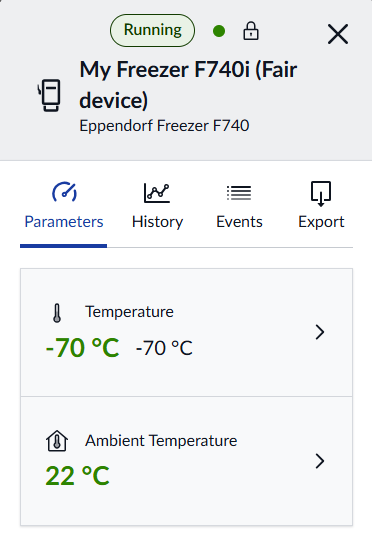
Touch-Friendly Controls
Buttons, fonts, toggles, and interactive elements have been sized and spaced to work naturally with touch input, reducing mis-taps and making the interface feel native on tablets and smartphones.
Why We Built This
The web application is your central hub for lab monitoring configuration, reporting, and situational awareness. We want it to be accessible in every context – not just when you’re at your desk. At the same time, this is not a replacement for the dedicated VisioNize Incidents App for iOS and Android, which remains the best choice for on-the-go incident management and push notifications. Instead, this update ensures a consistent, high-quality experience across all the places you interact with VisioNize Lab Suite.
The Benefits
- Work from anywhere – Full web application functionality on desktop, tablet, and mobile
- No workarounds needed – Layouts and controls designed for every screen size from the ground up
- Consistent experience – The same look and feel regardless of the device you pick up
- Complements the mobile app – Use the right tool for the right task, always with a great experience