
Incident update settings
Incidents in VisioNize Lab Suite move through different stages. They are created, may be escalated, can be acknowledged, expire, or resolve automatically when conditions return to normal. Previously, every change in an incident’s lifecycle triggered a notification.
With incident update settings, you can now choose which updates your team receives.
What’s new
Choose the updates that matter to your team
Every team works differently. You may want notifications when incidents are created, escalated, or acknowledged, but not when they resolve automatically during the configured delay period.
You can now select the incident lifecycle changes that should trigger a notification for each notification rule. This gives you more flexibility to match notifications to your team’s workflow.
Stay informed without the extra noise
Choose the updates that help your team take action and leave out those that do not. You’ll spend less time sorting through notifications and more time focusing on the incidents that need your attention.
This makes notification rules more flexible and better aligned with the way your lab operates.
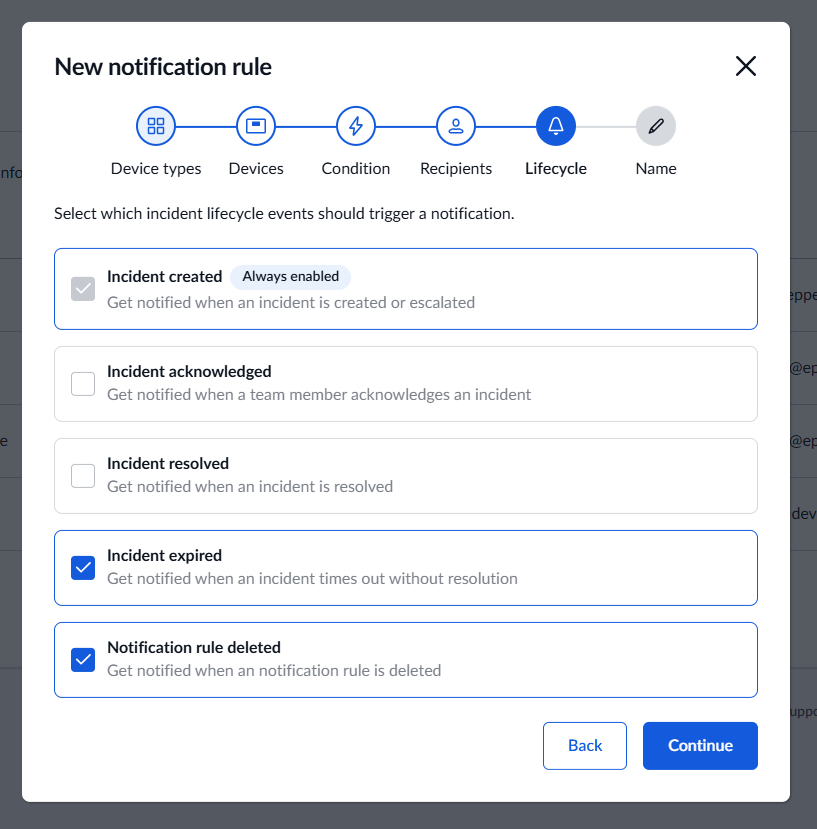
Within a notification rule, simply select the stages you want to be notified about:
- Incident created (mandatory)
- Incident acknowledged
- Incident resolved
- Incident expired
- Notification rule deleted You can select one stage, several stages, or all stages, depending on what your team needs to know.
Your existing notifications remain unchanged. Existing notification rules continue to include all incident lifecycle stages by default. This means you’ll receive the same notifications as before. To adjust an existing rule, open it and go to Lifecycle. Then select the incident stages you want to receive notifications for.
The benefits
- Flexible notification setup - Choose which incident updates trigger notifications
- Less notification fatigue - Avoid updates that are not relevant to your workflow
- Better focus - Keep attention on changes that require action
- Team-specific configuration - Adapt notification rules to the needs of different teams